Missed-call text-back is an automation that texts a caller within seconds of their call going unanswered, so the conversation keeps going by message instead of dying at voicemail. To set it up properly for a local business you need five things: a phone number that can both receive calls and send texts, a trigger that fires on a true missed call, a short message that sounds like you, the carrier registration and opt-out handling that keep your texts deliverable, and a follow-up path that turns the reply into a booking in your CRM. The automation itself takes an afternoon. Doing it well, so it earns bookings instead of annoyed replies, is what this guide covers.
Most local businesses miss calls. You’re on a roof, in a treatment room, driving between jobs or helping the customer in front of you. The caller hears voicemail, hangs up and calls the next listing on Google. You never know they existed.
A text-back changes the outcome for a lot of those calls, because the caller now has a reply in their hand that says you noticed and you’re responsive. Many people prefer to text anyway, and a text thread is easier to pick up between jobs than a voicemail queue.
It’s also the cheapest automation on the list. No AI model, no complex logic, one trigger and one message. That’s why we usually build it first, before the bigger manual tasks worth automating, and before an AI receptionist for businesses that aren’t ready for one.
What you need before you build
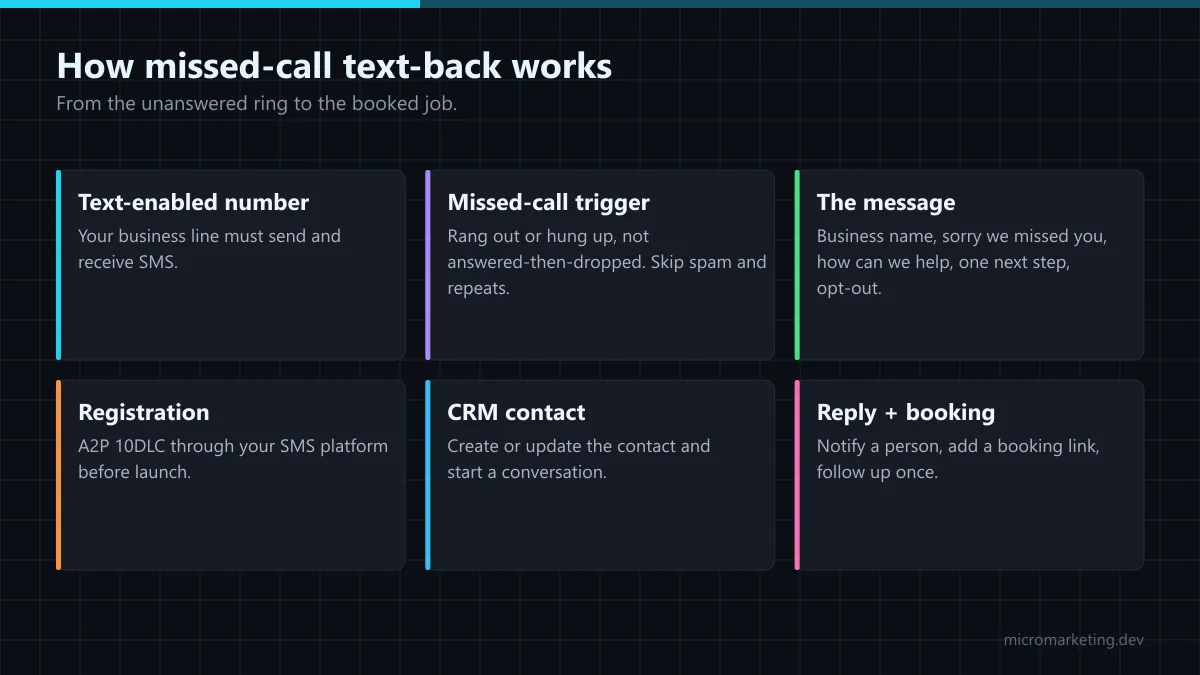
Check these four things first. Each one has sunk a project we’ve seen.
1. A number that can text. Your business number must be able to send SMS. Numbers on CRM phone systems and VoIP platforms often are, or can be enabled. A traditional landline usually needs text-enabling with your carrier, or you port the number to a platform that does both. Don’t build on a number that can’t text and plan to “sort it later.”
2. A platform that sees the missed call. The automation needs a signal that a call rang and wasn’t answered. That signal comes from the phone system the number lives on. If your calls ring a cell phone directly, there’s often nothing to trigger on; you’d forward through a platform that tracks call status instead.
3. Carrier registration. In the U.S., automated texting from regular 10-digit numbers goes through carrier registration (commonly called A2P 10DLC). Your SMS platform, whether that’s a CRM with built-in messaging or a provider such as Twilio, walks you through registering your business and use case. Unregistered messages can be filtered. Start this early, because approval isn’t instant.
4. A CRM to land the conversation in. The text-back should create or update a contact and start a conversation record, so replies don’t vanish into a phone nobody checks. If you don’t have a CRM, a text-back is a reasonable excuse to get one.
Step 1: choose where the automation lives
You have three practical options.
Inside your CRM’s phone system. Platforms like GoHighLevel include calling, SMS and workflow automation in one place, with a missed-call trigger built in. If your number is already on the platform, this is the fastest route. It’s how we set it up in Micro CRM, our GoHighLevel-based platform for most clients.
In a workflow tool connected to your phone provider. If your calls run on a VoIP or telephony provider with webhooks, a tool such as n8n can receive the “call ended, unanswered” event and send the text through your SMS provider. More flexible, more moving parts.
In the phone provider itself. Some business phone systems offer a simple “auto-text on missed call” feature. Easy, but usually without CRM logging or follow-up sequences.
For most local businesses the first option is right. Use the second when you need custom logic, such as different messages per department, or when your phone system and CRM are different products.
Step 2: define what counts as a missed call
This sounds obvious. It isn’t.
- A call that rang out to voicemail: yes.
- A call the caller hung up on after two rings: yes, usually.
- A call that was answered and then dropped: no, and texting “sorry we missed you” after you just spoke is embarrassing.
- A call during business hours vs after hours: both, but with different messages.
- A spam or robocall: no. Most platforms let you skip numbers flagged as spam or with no caller ID.
- A second missed call from the same number within an hour: don’t send a second text-back. One is helpful; two is noise.
Write these rules down before you configure anything, then test each case.
Step 3: write the message
The first text matters more than any automation after it. A good missed-call text-back is:
- Short. Two or three sentences.
- Identified. Your business name, every time.
- Apologetic and useful. “Sorry we missed your call” plus “how can we help?”
- One next step. Reply here, or a link to book.
- Compliant. A way to opt out (a “Reply STOP to opt out” line is the usual pattern).
A working example for a plumber:
Hi, it’s Riverside Plumbing. Sorry we missed your call, we’re likely on a job. Reply here with what you need and we’ll get right back to you, or book a time at [link]. Reply STOP to opt out.
And an after-hours variant:
Hi, it’s Riverside Plumbing. We’re closed right now but we read every message. Tell us what’s going on and we’ll reply first thing. For an emergency, call [number]. Reply STOP to opt out.
Avoid promotions, emojis and anything that reads like marketing. The caller phoned you with a need; meet the need.
Step 4: handle compliance properly
Automated texting has rules, and getting them wrong gets your number filtered or worse. The practical minimums:
- Register your number and use case with your SMS platform before sending (see above).
- Honor opt-outs instantly. STOP, UNSUBSCRIBE and similar keywords must stop all further texts. Most platforms handle this automatically; confirm it.
- Identify yourself in every message.
- Don’t add the caller to marketing lists because they called you once. A missed-call text-back is a reply to their contact; it isn’t consent for promotional campaigns.
- Keep records of what was sent and when, which your CRM does if the automation lives there.
This isn’t legal advice. Rules vary and change, so if you’re in a regulated field such as healthcare, check the wording and the data handling with your lawyer.
Step 5: route the reply to a human quickly
The text-back is a bridge, not a destination. When the caller replies, someone needs to see it. Configure:
- A notification to the person on duty: push, email or a Slack channel.
- A conversation record in the CRM, assigned to an owner.
- A fallback. If nobody replies within a set time (say, fifteen minutes during hours), escalate to a second person or send the caller a booking link.
The fastest-responding business usually gets the job. The text-back buys you a few minutes of goodwill; the reply has to arrive inside that window.
Step 6: connect it to booking and follow-up
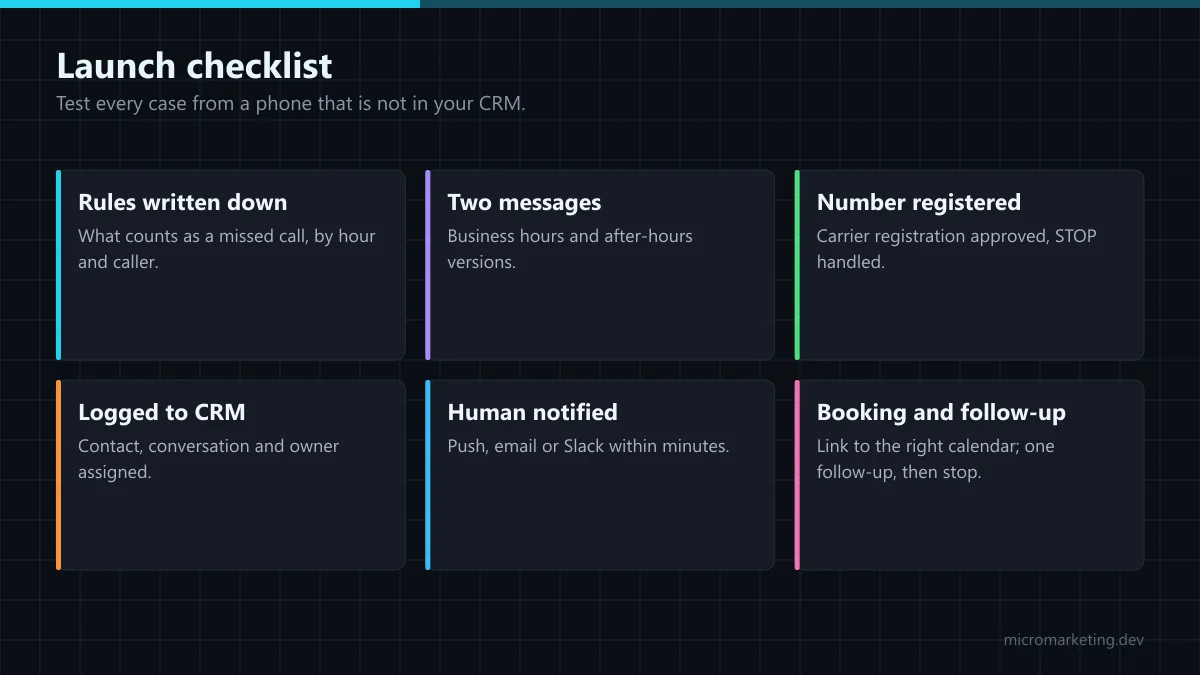
Once the basic flow works, add the pieces that turn a conversation into revenue:
- A booking link in the first or second message, tied to the right calendar.
- A tagged contact so you can see how many missed calls became bookings.
- A short follow-up if the caller doesn’t reply: one message the next day, then stop.
- A hand-off into your pipeline if the reply is a quote request, so the lead gets the same treatment as a form fill.
This is the point where a simple text-back becomes part of a real follow-up system. That’s the work our workflow automation service does: connecting the phone, the CRM, the calendar and the team so no lead falls between them. For a home-services company, where the lead is often a homeowner with water on the floor, the speed of that chain is the business. See how we approach it on our AI automation for home-services businesses page.
Step 7: test it like a customer
Before you call it done, run these tests from a phone that isn’t in your CRM:
- Call during hours and hang up before voicemail. Did the text arrive within seconds? Was it the business-hours message?
- Call after hours. Did you get the after-hours version?
- Reply to the text. Did the reply reach a person and create a CRM conversation?
- Reply STOP. Did everything stop?
- Call twice in ten minutes. Did you get one text, not two?
- Have a teammate answer a call. Did the automation correctly stay quiet?
Fix anything that fails and keep the checklist for the next change.
Where missed-call text-back fits with an AI receptionist
A text-back catches calls you missed. An AI receptionist stops you missing them. They’re complementary. Businesses often start with text-back, see how many calls they were actually losing, and move to an AI receptionist when the volume justifies it. When both run, the AI handles the live call and the text-back covers hang-ups and callers who prefer texting. Both should log to the same CRM.
If you’re weighing that step, read our comparison of an AI receptionist, an answering service and a virtual receptionist, and our guide to AI receptionist cost in 2026.
Common mistakes we fix
- Texting from a number that can’t receive replies. The caller replies and nobody sees it.
- No opt-out line. Filtering and complaints follow.
- Sales copy in the first message. It reads as spam to someone who just needed a plumber.
- No owner for replies. The automation works; the human part doesn’t.
- Triggering on answered calls. Usually a wrong filter on call status.
- Forgetting the after-hours variant. “We’ll call right back” at 11 p.m. isn’t true.
Each of these is a ten-minute fix once you know to look.
Frequently asked questions
What is missed-call text-back?
Missed-call text-back is an automation that sends a text message to a caller within seconds of their call going unanswered. The text apologizes for the miss, asks how you can help and invites the caller to reply or book, so the conversation continues by message instead of ending at voicemail.
Can I set up missed-call text-back on my existing business number?
Usually, yes, but it depends on whether your number can send texts. Many business numbers on VoIP platforms are text-enabled or can be. A landline often needs to be text-enabled with your carrier or ported to a platform that supports both calls and SMS. Check this before you build anything.
Do I need to register my number before sending automated texts?
In the U.S., application-to-person texting from standard 10-digit numbers goes through carrier registration, often called A2P 10DLC, which your SMS platform handles with you. Unregistered traffic can be filtered or blocked. Complete registration before launch and keep your messages consistent with the use case you registered.
What should a missed-call text-back message say?
Keep it short and human: name your business, say sorry you missed the call, ask how you can help, and give one clear next step such as replying or a booking link. Include your business name every time and a way to opt out. Avoid sales language in the first message.
Does missed-call text-back work with an AI receptionist?
Yes, and the two fit well together. An AI receptionist answers most calls so fewer are missed, and text-back covers the calls that still slip through, such as hang-ups before the greeting or callers who prefer texting. The same CRM should log both so follow-up is in one place.
Get it set up this week
If you’d rather not wrestle with number registration and trigger rules, we’ll build the missed-call text-back, connect it to your CRM and calendar, and test every case above. Book a free strategy call. Want the full booking flow mapped? Book an AI Appointment Assistant session with Tony. You can also read how our workflow automation service connects the phone to the rest of your follow-up.
Newsletter
Get growth playbooks in your inbox.
Practical SEO, PPC, automation, and web strategy from the Micromarketing team. No fluff, unsubscribe anytime.