An AI receptionist costs whatever its plan, usage, add-ons and setup add up to for your call volume, and that number is almost never the “starting at” price on the pricing page. Self-serve products advertise low monthly entry plans with a small call or minute allowance. Mid-tier plans add more minutes, more numbers and calendar or CRM integrations. Done-for-you setups add an onboarding fee and ongoing management. The right way to understand AI receptionist cost is to break it into its parts, put your own call history against each part, and compare the total against what you pay today for missed calls, voicemail and the hours your team spends on the phone. This guide does exactly that.
The short answer on AI receptionist pricing
Almost every AI receptionist bill in 2026 is built from the same five parts:
- A monthly subscription that includes a set number of calls or minutes.
- Usage beyond that allowance, billed per minute or per call.
- Add-ons such as extra phone numbers, SMS, outbound calls, bilingual support and premium integrations.
- Setup, either free self-serve, a one-time onboarding fee, or an agency’s done-for-you configuration.
- Your own time spent writing scripts, reviewing transcripts and fixing wrong answers.
Vendors mix these differently, and that’s why two products that look similar on a feature table can produce very different bills for the same business. The rest of this article walks through each part, then gives you a worksheet to model your own number.
Pricing model 1: monthly subscription with an allowance
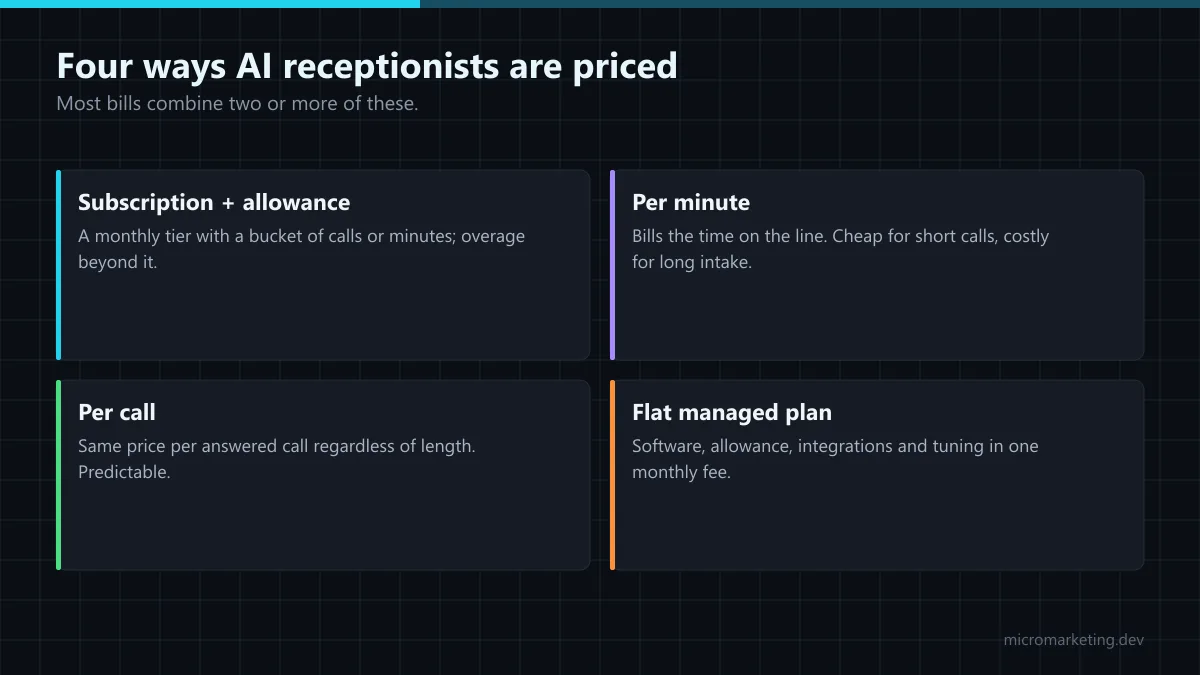
This is the most common model. You pick a tier, and the tier includes a bucket of calls or minutes each month. Public examples at the time of writing: Rosie advertises plans “starting at $49/month” with a free trial, and Dialzara advertises “from $29” on its site. Smith.ai publishes AI-first, hybrid and human-first plans that are priced on a different basis, which we cover below.
What to check on a subscription plan:
- Is the allowance in calls or minutes? A 100-call allowance and a 100-minute allowance are very different if your average call is four minutes.
- Do unused minutes roll over? Most don’t.
- What counts as a call? Some vendors count every answered call, including spam and wrong numbers. Others only count calls that pass a screening step.
- Which features are locked to higher tiers? Calendar booking, CRM sync, multiple numbers and custom voices are common upsells.
A subscription suits businesses with steady, predictable call volume. If your phones spike seasonally, look closely at the overage rate, because that’s what you’ll pay during your busiest, most valuable month.
Pricing model 2: per-minute usage
Per-minute pricing bills the time the AI spends on the line. Sometimes it’s the whole price; more often it’s the overage rate once you pass the subscription allowance.
Per-minute works in your favor when calls are short: hours questions, directions, “are you open Saturday?” It works against you when calls are long: intake interviews, insurance questions, multi-step bookings with reschedules. A dental office that takes new-patient calls with a dozen questions each will burn minutes faster than a landscaper confirming a quote window.
Two details that change the math:
- Rounding. Billing per second, per six seconds or per full minute changes the cost of a 70-second call noticeably at volume.
- Transfer time. Ask whether minutes keep ticking after the AI transfers the call to a person. On some platforms they do.
Pricing model 3: per-call pricing
Per-call pricing charges the same amount for every answered call, regardless of length. Smith.ai, for example, lists its human-first hybrid plans per call on its plans page. Per-call pricing makes your bill easy to predict and rewards you for having long, thorough calls, which is why it’s popular with firms whose calls involve intake.
The questions to ask are about what counts: spam calls, hang-ups within a few seconds, calls that are just transferred, and repeat callers in the same day. A good vendor will tell you exactly which of those are free.
Flat managed plans. Agencies and managed providers often quote a flat monthly fee that bundles the software, a generous call allowance, integration maintenance and ongoing tuning. It’s the most expensive line item on paper and often the cheapest in practice for a business whose owner would otherwise spend evenings editing scripts.
We cover what’s included in a managed plan in the section on done-for-you setup below.
What add-ons usually cost extra
Even on a plan that covers your calls, these items tend to be priced separately:
- Additional phone numbers or locations. Each line, office or brand usually counts as its own number.
- SMS. Texting callers a booking link or confirmation is often billed per message or as a messaging add-on.
- Outbound calls. Appointment reminders and follow-ups run on different rates than inbound answering.
- Premium integrations. Direct booking into a practice-management or field-service system is sometimes a higher tier than a plain Google Calendar connection.
- Bilingual or multilingual support. Spanish-language answering may be included or may be a per-language add-on.
- Call recording retention. Longer storage of recordings and transcripts can be metered.
- Custom or cloned voices. Using a specific voice can carry a fee.
Setup fees: self-serve vs done-for-you
Setup is where AI receptionist pricing splits into two very different experiences.
Self-serve. You sign up, forward your number, paste in your hours and FAQs, connect a calendar and start taking calls. The setup fee is zero and the real cost is your time. For a single-location business with simple calls, this can be enough.
Done-for-you. A vendor or agency interviews you about your call types, writes the scripts and escalation rules, connects the calendar and CRM, runs test calls, and tunes the system for the first weeks. There’s a one-time fee for the build and usually a monthly fee for management.
Our AI receptionist service is the second kind. The build covers the knowledge base, booking rules across staff and locations, CRM logging, transfer rules by caller type and time of day, and a test-call plan run on your real call types. The monthly side covers weekly transcript review, fixes and changes as your business changes. If you want to see what a well-run front desk looks like before you decide, our best AI receptionist framework gives you the five points we score every product on.
When is done-for-you worth the fee? Usually when any of these are true:
- you have more than one calendar, provider or location,
- your bookings have rules (appointment types, buffers, insurance questions),
- you need CRM records that match how your team works,
- the person who would set it up is also the person who runs the business.
The hidden cost: your own time and the calls it gets wrong
Every AI receptionist gets some calls wrong in the first weeks. Names misheard, an address spelled wrong, a question it answered from a stale FAQ. The cost of those mistakes is real, and it lands in two places:
- Review time. Someone has to read transcripts, catch errors and correct the knowledge base. Budget an hour or two a week early on, less later.
- Lost calls. An AI that transfers too late or answers confidently and wrongly can cost you the very booking you bought it to capture.
The cheapest way to reduce both is a proper test before launch and a weekly review after. If nobody on your team has time for that, it’s a reason to price in managed support rather than a reason to skip it.
A worksheet to model your real monthly cost
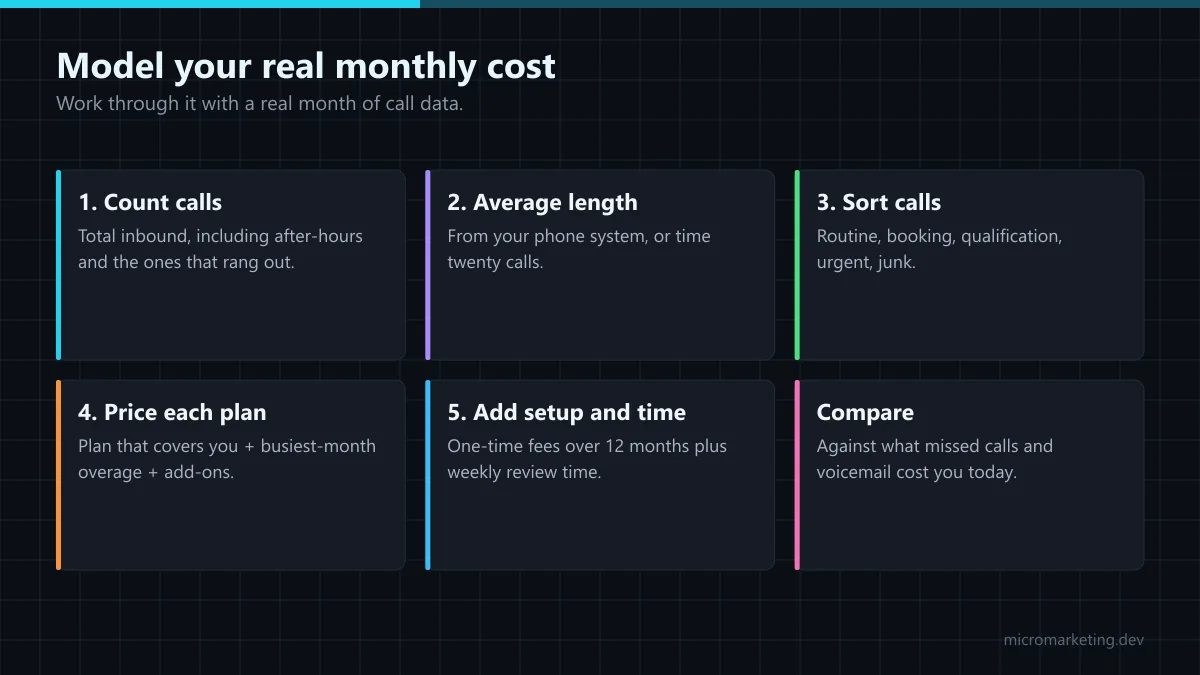
Work through this with a real month of call data from your phone system or carrier.
- Count your calls. Total inbound calls for the month, including after-hours and weekends. Note how many went to voicemail or rang out.
- Measure your average call length. Most phone systems report this. If yours doesn’t, time twenty calls and average them.
- Sort calls into buckets. Routine questions, bookings, qualification, urgent, and junk. The AI will handle the first three; the fourth transfers; the fifth should be screened for free.
- Price each plan against your numbers. For each vendor, take the plan that covers your monthly calls or minutes, add the overage you’d pay in your busiest month, then add the add-ons you listed earlier.
- Add setup and your time. Spread any one-time fee across twelve months. Add a realistic estimate of weekly review time at your hourly rate.
Now compare that total with what missed calls cost you today. If you know your average job or appointment value and roughly how many calls ring out each week, you’ll have a rough idea of what a single recovered booking a week is worth. For most service businesses, that figure is the deciding one, not the software price.
What a dental office’s bill looks like
Dental practices are a good example because their calls are long and valuable. A new-patient call often covers insurance, availability, the reason for the visit and directions. That makes per-minute plans expensive and per-call or flat plans attractive. Practices also need direct booking into their practice-management software, which is usually a higher integration tier, and they need firm rules about what the AI can and cannot say about clinical questions.
If that’s your situation, see our AI automation for dental practices page for how we set up the front desk, reminders and recall for practices, and read our guide to AI receptionists for dental offices before you switch.
How to compare quotes without getting played
A few habits that keep comparisons honest:
- Ask for the price at your volume, in writing. Not the starting price. Give the vendor your monthly calls and average length and ask for the all-in number.
- Ask what happens in month four. Introductory pricing and free trials end. Get the renewal rate.
- Ask for the overage rate and the rounding rule. Then compute your busiest month.
- Ask which integrations are included at that tier. A calendar connection that’s “available” may be “available on the next plan up.”
- Run the same ten test calls on every finalist. Price only matters once the product passes your calls.
If you’d rather we do the comparison with you, our AI automation services team runs this exercise as part of every front-desk project. And if answering the phone is only one of the manual jobs eating your week, start with the manual tasks small businesses should automate in 2026.
Frequently asked questions
How much does an AI receptionist cost per month?
Self-serve AI receptionist plans are usually advertised from a few dozen dollars a month for a small call allowance, with higher tiers for more minutes, more numbers and integrations. Your real monthly cost depends on how many calls you get, how long they run and which add-ons you need, so model it against your own call history rather than the starting price.
Is an AI receptionist cheaper than a human receptionist?
For answering the phone, usually yes, because you pay for a plan and usage instead of wages, benefits and coverage for breaks and after-hours. But an AI receptionist only replaces the phone-answering part of the job. If your front-desk person also checks patients in, handles payments or manages the office, you’re comparing the AI against a slice of their role, not the whole salary.
What is the difference between per-minute and per-call AI receptionist pricing?
Per-minute pricing bills the time the AI spends on the line, so long calls cost more. Per-call pricing bills each answered call the same regardless of length. Short, simple calls favor per-minute plans; long booking or intake calls favor per-call or flat plans. Check your average call length before you choose.
Are there setup fees for an AI receptionist?
Some vendors charge nothing to start and expect you to set it up yourself. Others charge a one-time onboarding fee, and agencies charge for done-for-you setup that covers scripts, calendar and CRM integration and test calls. Ask what setup includes and whether it’s refundable if the system fails your test calls.
What hidden costs should I watch for with AI receptionist pricing?
The usual surprises are overage rates once you pass your plan’s allowance, charges for extra phone numbers or locations, paid integrations with your calendar or CRM, outbound calls and SMS billed separately, bilingual support as an add-on, and the time your own team spends correcting the AI’s answers in the first weeks.
Get a real number for your phones
Send us a month of call data, or just tell us roughly how many calls you get and how long they run. We’ll model the cost of an AI receptionist for your business against what missed calls cost you now, with no vendor bias. Book a free strategy call. Prefer to map the booking flow first? Book an AI Appointment Assistant session with Tony. You can also read how our AI receptionist service is priced and launched.
Newsletter
Get growth playbooks in your inbox.
Practical SEO, PPC, automation, and web strategy from the Micromarketing team. No fluff, unsubscribe anytime.