
The Manual Tasks Small Businesses Should Automate in 2026
A department-by-department list of manual tasks small businesses should automate in 2026, and which tool fits each: AI agent, AI receptionist or n8n.

The manual tasks worth automating first in 2026 are the ones that happen every day, follow clear rules and cost you money when they’re late: answering and booking calls, moving new leads into your CRM, following up on quotes, chasing invoices and building weekly reports. Plain workflow automation (often in n8n) handles the rule-based moves. An AI receptionist handles the phone. An AI agent handles the steps that need reading, judgment and drafting. This guide walks through the manual-task pain points an AI automation agency sees most often in 2026, department by department, and says which of the three fits each one.
How to spot a task worth automating
Before the list, a quick filter. A task is a strong candidate when it scores well on four questions:
- Frequency: does it happen daily or weekly?
- Rules: could you write the steps on one page?
- Cost of delay: does a slow response lose a customer, a payment or a booking?
- Data in reach: does the information already live in a tool with an API (forms, CRM, calendar, accounting, email)?
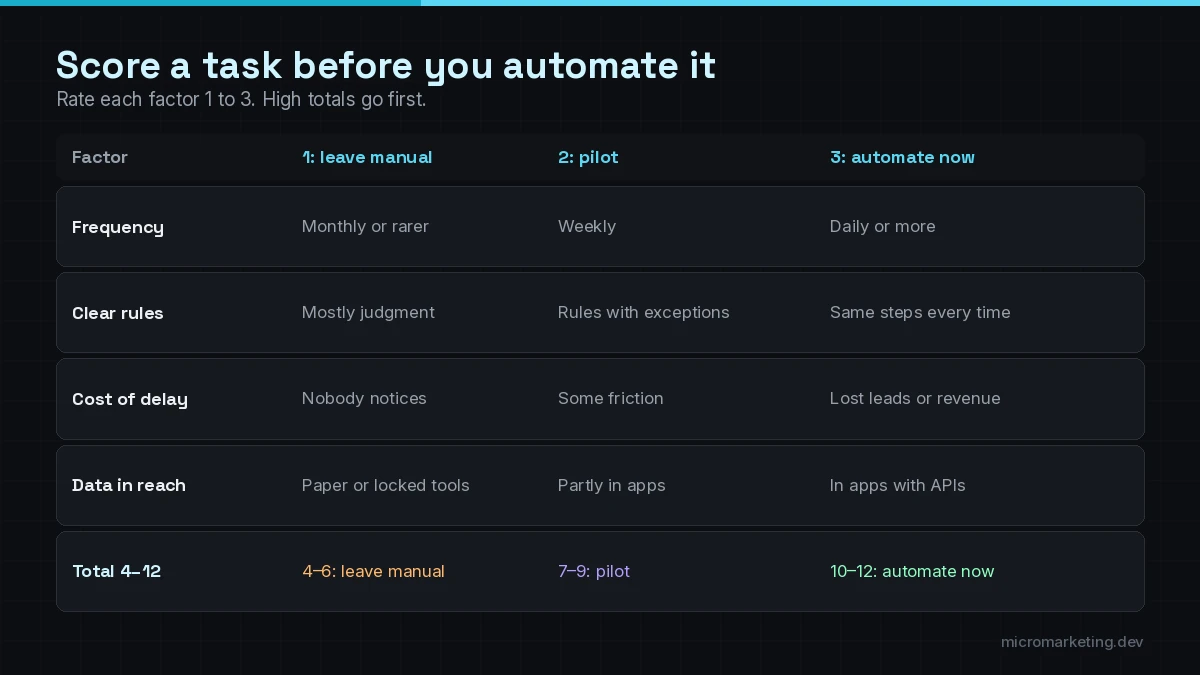
High on all four? Automate it now. High frequency but fuzzy rules? Pilot it with an AI step and a human approval. Rare and full of judgment calls? Leave it manual for now. That’s not a failure; it’s good scoping.
Front desk and phones
The front desk is where small businesses feel the pain first, because every miss is visible to a customer.
Missed calls and after-hours calls
Pain: calls go to voicemail at lunch, after 6 p.m. and on weekends, and many callers don’t leave a message. Fix: an AI receptionist that answers, handles common questions, books the appointment and texts your team a summary. Tool: AI receptionist.
Appointment booking, reminders and reschedules
Pain: staff spend the day on back-and-forth scheduling, and no-shows still happen. Fix: booking straight into your calendar from phone, web or text, plus automatic confirmations and reminders. Tool: AI receptionist for the calls; an n8n workflow for reminders and confirmations.
The same five questions, all day
Pain: hours, pricing ranges, parking, insurance, “do you do X?” Fix: a knowledge-grounded assistant on your website chat, SMS or WhatsApp, answering only from approved content. Tool: AI chatbots and assistants.
Sales and lead handling
Re-typing form fills into the CRM
Pain: someone copies leads from web forms, email and ad platforms into the CRM by hand, often a day late. Fix: every form posts straight to the CRM, tags the source and alerts the right person. Tool: an n8n workflow. This is deterministic work; it doesn’t need AI.
Slow first response to new leads
Pain: a lead fills out a form at 9 p.m. and hears back the next afternoon. Fix: an instant, personalized first reply and a routed task for the right salesperson. Tool: n8n for routing, with an AI step to draft the reply.
Lead research and qualification
Pain: reps spend time looking up companies and deciding who’s worth a call. Fix: an agent that researches the lead, checks it against your qualification rules, writes a short brief and updates the CRM, with a rep approving anything that goes to the customer. Tool: AI agent development.
Quote follow-ups that never happen
Pain: quotes go out and nobody follows up. Fix: a timed sequence that checks the deal stage, drafts a follow-up and asks the owner to approve or skip. Tool: n8n plus an AI drafting step.
Operations
Job intake and dispatch
Pain: service requests arrive by phone, email and text and get re-entered into a scheduling tool. Fix: one intake flow that captures the details once and creates the job. Tool: n8n, fed by the AI receptionist or chatbot.
Inbox triage
Pain: a shared inbox mixes customer questions, vendor invoices, spam and urgent issues. Fix: an agent that classifies each message, drafts replies for routine ones and flags urgent ones to a person. Tool: AI agent, with replies approval-gated at first.
Status updates customers keep asking for
Pain: “Where’s my order?” “When is the tech coming?” Fix: automatic updates when the job or order status changes, plus a chatbot that can look up status. Tool: n8n for the updates; a chatbot for the lookups.
Finance and admin
Invoice chasing
Pain: overdue invoices sit until someone has time to send awkward emails. Fix: polite reminders on a schedule, stopping automatically once payment lands. Tool: n8n connected to your accounting or payments tool.
Payment and invoice sync
Pain: payments, invoices and the CRM disagree, so someone reconciles by hand. Fix: a sync workflow with logging and alerts when records don’t match. Tool: n8n.
Document intake
Pain: forms, PDFs and receipts get read and re-typed. Fix: an AI step that extracts the fields, with a person checking low-confidence results. Tool: AI agent or an AI node inside n8n.
Marketing and reporting
Review requests
Pain: happy customers are never asked for a review. Fix: an automatic, honest request after a completed job, sent to every customer, not only the happy ones. Tool: n8n.
Weekly reporting
Pain: someone spends Monday morning exporting numbers from five tools into a spreadsheet. Fix: a scheduled report that pulls the numbers, writes a short summary and posts it to email or Slack. Tool: n8n plus an AI summary step, or a reporting agent.
Content repurposing
Pain: one good article or video never becomes the posts and emails it could be. Fix: a pipeline that drafts variations for review. Tool: an AI drafting step with human editing. Never auto-publish.
Which tool fits which job
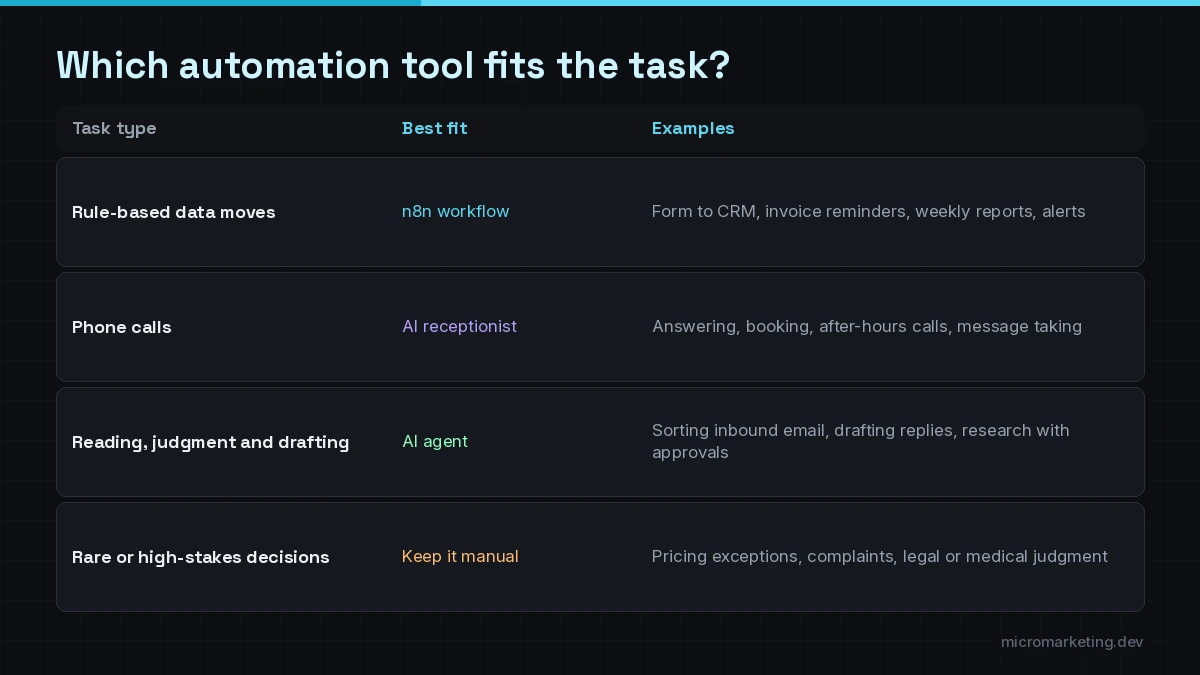
A simple rule of thumb:
- If the steps never change, use a workflow. It’s cheaper, faster and easier to audit. See our n8n automation work.
- If the work happens on the phone, use an AI receptionist for the front desk, or AI voice agents for outbound follow-up, reminders and support lines.
- If the work needs reading, deciding and drafting, use an AI agent, and keep a human approval on anything a customer sees until it has earned trust.
Most real systems mix all three. The receptionist books the job, the workflow creates the record, and the agent drafts the follow-up.
Guardrails that keep automation from creating new problems
Automation that fails silently is worse than no automation. Whatever you build, insist on:
- Error alerts. In n8n, for example, you can attach an error workflow that runs when an execution fails and sends you a Slack or email alert.
- Human approval on customer-facing messages, refunds, deletions and anything involving money.
- Least-privilege access so each automation can only touch the data it needs.
- Logs you can read six weeks later when someone asks why something happened.
- A risk review for AI steps. The NIST AI Risk Management Framework is a useful, free reference for thinking about AI risks, even for a small team.
How we’d start in your business
We don’t start with tools. We start with a list like the one above, filled in with your real tasks, then pick the one or two with the clearest payback. That’s how our AI automation services work: map the manual work, build the smallest reliable version, add approvals and alerts, measure it, then expand. We’re based in Boca Raton and work with businesses across South Florida and remote teams across the US.
If agents are the piece you’re curious about, read AI agents for small business: a practical 2026 guide. If your biggest leak is the phone, start with how to pick the best AI receptionist.
Frequently asked questions
What tasks should a small business automate first?
Start with tasks that happen daily, follow clear rules and cost you money when they’re late: answering and booking calls, entering leads into the CRM, quote follow-ups, invoice reminders and weekly reports. They’re the easiest to build reliably and the easiest to measure.
Do I need AI for every automation?
No. Many of the most useful automations are plain rule-based workflows, like moving form fills into a CRM or sending invoice reminders. Use AI only for steps that need reading, classifying or drafting, and keep a human approval where mistakes would reach customers.
What’s the difference between an AI agent and a workflow automation?
A workflow follows fixed steps you define: when X happens, do Y. An AI agent works toward a goal, decides which tools to use and can handle messier inputs, like an email that could be a complaint or a quote request. Agents need tighter permissions and more testing.
How do I know if an automation is working?
Measure it against the manual baseline: time spent, response time, errors and missed items before and after. Add alerts for failed runs and review the logs regularly during the first weeks.
Is there AI automation near me in Boca Raton?
Yes. Micromarketing is based at 1000 N Federal Hwy in Boca Raton, FL, and works with businesses across Boca Raton, Delray Beach, Deerfield Beach, Pompano Beach and Fort Lauderdale, as well as remote teams across the US.
Tell us the task that eats your week
Bring one manual task you’re tired of doing. We’ll show you whether it needs a workflow, an AI receptionist or an AI agent, and what the smallest useful version looks like. Book a free strategy call. The first consult is free. To see everything we automate, start with our AI automation services.
Newsletter
Get growth playbooks in your inbox.
Practical SEO, PPC, automation, and web strategy from the Micromarketing team. No fluff, unsubscribe anytime.