A good n8n automation expert maps your process before building, designs every workflow to fail safely with error workflows, retries and alerts, picks the right hosting (n8n Cloud or self-hosted), and hands over documented workflows your team can maintain. When you hire, test for those four things, not just for how many nodes someone knows. This guide covers what an n8n consultant actually does, the skills that matter, the questions to ask and the red flags that signal a fragile build.
Why businesses hire an n8n expert
n8n is a workflow automation platform that connects your apps, moves data between them and can run AI agents inside workflows. It’s flexible: you can write code steps in JavaScript or Python, call any API and self-host it on your own infrastructure. That flexibility is also why projects go sideways. It’s easy to build a workflow that works in a demo and quietly breaks in production.
Businesses usually bring in an expert when:
- a workflow is business-critical (leads, orders, invoices, bookings) and can’t fail silently,
- the logic is beyond simple “when this, do that” automations,
- they want to self-host for data control or cost and need it set up properly,
- they want AI steps, like classifying emails or drafting replies, inside reliable workflows,
- a DIY setup has grown into a tangle nobody wants to touch.
What a good n8n automation expert does
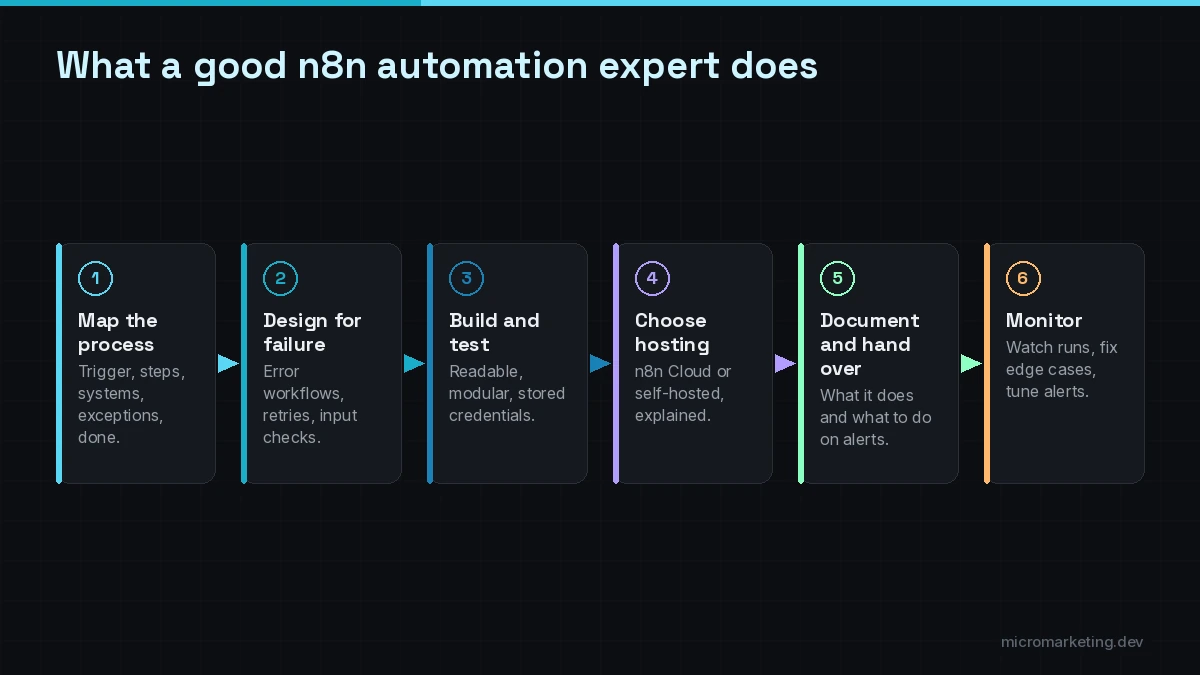
1. Maps the process first
Before opening the editor, they write down the trigger, the steps, the systems, the data each step needs, the exceptions and what “done” looks like. A lot of automation problems are really process problems, and mapping catches them early.
2. Designs for failure
Every production workflow will hit an expired credential, a rate limit or a malformed record at some point. n8n has a built-in pattern for this: an error workflow that starts with the Error Trigger node and runs when another workflow fails, so you can send an email or Slack alert. n8n’s error-handling docs explain how it works. An expert also adds retries where they’re safe, checks inputs early and avoids double-processing when something reruns.
3. Builds cleanly
Readable names, sub-workflows for repeated logic, credentials stored in n8n’s credential system rather than pasted into nodes, and no mystery code steps without comments.
4. Picks the right hosting
n8n is available as a hosted cloud service or self-hosted. n8n’s hosting docs say you can self-host on your own infrastructure, on-premises or in a private cloud, and that without a license key a self-hosted install runs as the free Community edition. An expert explains the trade-offs for your situation: cloud means less maintenance, while self-hosting gives you more control but makes you responsible for updates, backups and security.
5. Documents and hands over
You should get a short write-up for each workflow: what it does, what triggers it, what to do when it alerts, and who owns it.
6. Monitors after launch
The first few weeks show the edge cases. A good expert watches executions, fixes what breaks and tunes the alerts so they’re useful rather than noisy.
n8n Cloud vs self-hosted: what your expert should explain
| n8n Cloud | Self-hosted | |
|---|---|---|
| Setup | Sign up and build | Server, database, domain, SSL |
| Maintenance | Handled by n8n | Your team or your provider |
| Data location | n8n’s hosting | Your infrastructure |
| Cost model | Monthly plan based on workflow executions | Free Community edition, or a paid license, plus hosting costs |
| Best for | Most small teams | Data-sensitive, high-volume or technical teams |
On cost: n8n’s pricing page says its plans are priced on monthly workflow executions regardless of complexity, with unlimited users and workflows on every plan. As of October 18, 2026, the cloud Starter plan was listed at €20 a month billed annually for 2,500 executions, and Pro at €50 a month billed annually for 10,000 executions. Check the page for current numbers before you budget. Last verified: October 18, 2026.
Skills to test for
- API fluency: comfortable with HTTP requests, authentication, pagination and webhooks, because not every app has a ready-made node.
- Data handling: can transform, merge and validate data without fragile workarounds.
- Error design: can describe their error-workflow and retry approach without prompting.
- AI judgment: knows when to use n8n’s AI Agent node and when a plain rule is cheaper and more reliable.
- Security habits: least-privilege credentials, secrets kept out of workflow JSON, webhook endpoints that aren’t left open.
- Communication: can explain a workflow to a non-technical owner.
Questions to ask before you hire
- “How do you map a process before building?”
- “What happens when this workflow fails at 2 a.m.?”
- “Cloud or self-hosted for us, and why?”
- “How will you store our credentials?”
- “What documentation do we get?”
- “Who owns the workflows and the n8n account?”
- “What does support look like after launch?”
Red flags
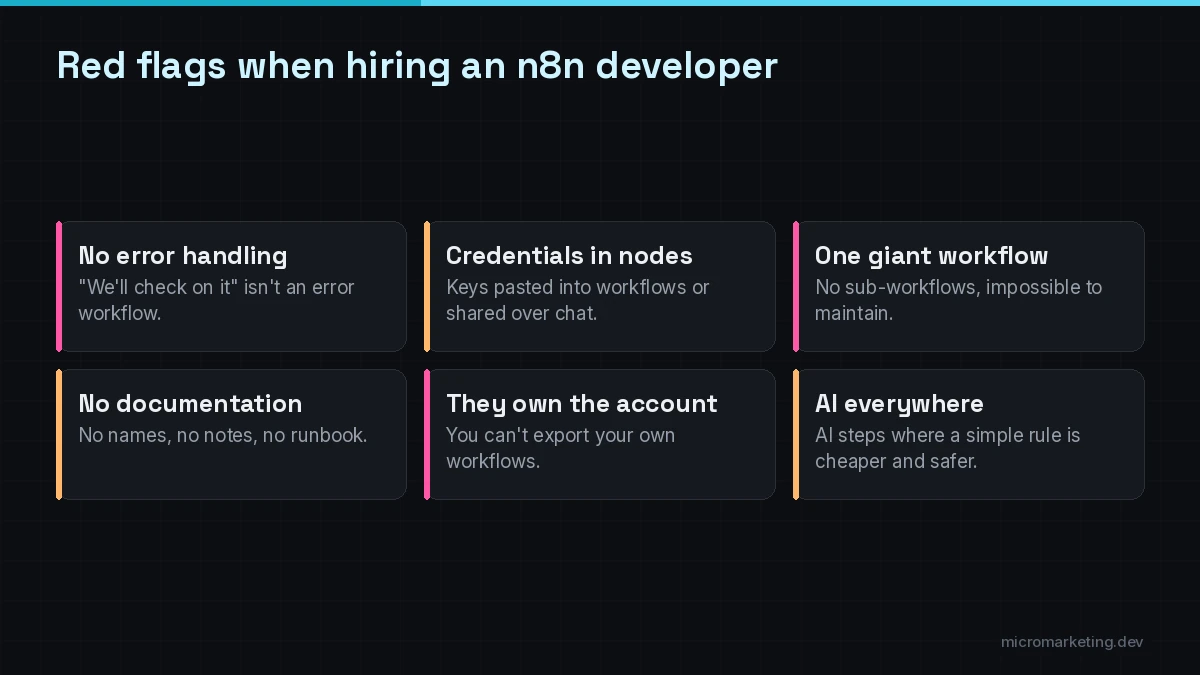
- No error handling beyond “we’ll check on it.”
- Credentials pasted into nodes or shared over chat.
- One giant workflow for everything, with no sub-workflows.
- No documentation or naming conventions.
- The provider owns the account and you can’t export your workflows.
- AI everywhere, including steps a simple rule handles better.
What to prepare before your first call
You’ll get a more accurate scope, and a faster start, if you bring:
- The process in plain words: what triggers it, the steps, who’s involved and what “done” looks like.
- The tools involved, with notes on which plan you’re on, since some APIs are limited on lower tiers.
- A few real examples, including at least one messy one, with sensitive data removed.
- What happens today when it goes wrong, and who notices.
- Your hosting preference, or the constraints that will decide it: data rules, existing servers, in-house skills.
- Any existing n8n workflows you’d like reviewed, exported as files.
An expert should be able to tell you from this what’s straightforward, what’s risky and what should stay manual. That’s how we open every engagement for our n8n automation service.
Freelancer or agency?
A freelance n8n developer can be a great fit for a single, well-defined workflow, especially if you have someone technical in-house. An agency makes more sense when workflows touch several departments, need ongoing monitoring, or mix n8n with other tools and custom code. Either way, the questions above apply.
How we approach n8n projects
Our n8n automation service follows the same steps: map the process, design for failure, build with error workflows, retries and alerts, choose hosting that fits, document and hand over. We also pick per job: some workflows are better in Zapier, Make or a direct API integration, and we’ll say so. For a real example of the kind of build we write about, see our walkthrough on syncing HubSpot deal stages to AdRoll retargeting with MCP and n8n. If you’re still deciding what to automate first, start with the manual tasks worth automating in 2026. Our broader AI automation services cover agents and chatbots as well.
Frequently asked questions
What does an n8n automation expert do?
They map your process, build n8n workflows that connect your apps and move data between them, add error handling and alerts, set up hosting, document the workflows and monitor them after launch.
Should I use n8n Cloud or self-host n8n?
Cloud is simpler: n8n handles hosting and updates. Self-hosting gives you more control over data and can lower costs at volume, but you take on updates, backups and security. n8n’s docs say a self-hosted install runs as the free Community edition without a license key.
How much does n8n cost?
n8n prices its plans on monthly workflow executions. As of October 18, 2026, its pricing page listed cloud plans starting at €20 a month billed annually. The self-hosted Community edition is free, though you pay for hosting. Check n8n’s pricing page for current numbers.
Can n8n run AI agents?
Yes. n8n has an AI Agent node and other AI nodes that let you add language-model steps to workflows, like classifying messages or drafting replies. A good expert keeps those steps inside workflows that still have error handling and human approval where needed.
Is n8n better than Zapier or Make?
It depends on the job. n8n is strong for complex logic, code steps and self-hosting. Zapier and Make can be quicker for simple automations. Choose per workflow, not per brand.
Get a second opinion on your workflows
Have an n8n setup that’s grown messy, or a process you want automated properly? Tell us what it does today. We’ll show you how we’d map it, harden it and hand it over. Book a free strategy call. The first consult is free.
Newsletter
Get growth playbooks in your inbox.
Practical SEO, PPC, automation, and web strategy from the Micromarketing team. No fluff, unsubscribe anytime.