On WhatsApp, Meta allows businesses to use AI for business-specific conversations: answering customer support questions, product Q&A and recommendations, lead qualification, order updates and booking, as long as customers have a prompt, clear path to a human. What Meta doesn’t allow is using the WhatsApp Business Platform to distribute a general-purpose AI assistant as the main product, a rule that took effect on January 15, 2026. On top of that, the usual WhatsApp rules still apply: opt-in before you message people, approved templates to start conversations, and free-form replies only inside the 24-hour customer service window.
Last verified: October 18, 2026, against the WhatsApp Business Messaging Policy (last updated September 23, 2026). This is a practical summary, not legal advice. Meta updates these rules often; check the official pages before you launch.
Two ways to put AI on WhatsApp
There are two different routes, and the rules overlap but aren’t identical.
1. Meta’s own AI for businesses (Meta Business Agent). Meta offers an AI service inside the WhatsApp Business app. According to the WhatsApp Help Center, it’s set up from the Tools tab under “AI agent,” you can teach it about your business, and you choose where it replies: all new one-to-one chats, all except existing contacts, only chats that start from your Facebook or Instagram ads, or paused while it keeps learning. The Help Center also notes it’s only available in limited countries to select businesses for now, with a waitlist, and that not all languages are supported. This is the closest thing to a built-in “Facebook virtual assistant” for small businesses.
2. Your own AI on the WhatsApp Business Platform (the API). You, or an agency like us, build an assistant on a model of your choice (OpenAI, Grok, Claude or others) and connect it to WhatsApp through the Business Platform, usually via a solution provider. This gives you control over the knowledge base, integrations (CRM, calendar, order system) and handoff, and it’s where the Business Messaging Policy and platform terms apply most directly.
What’s allowed: business-specific AI
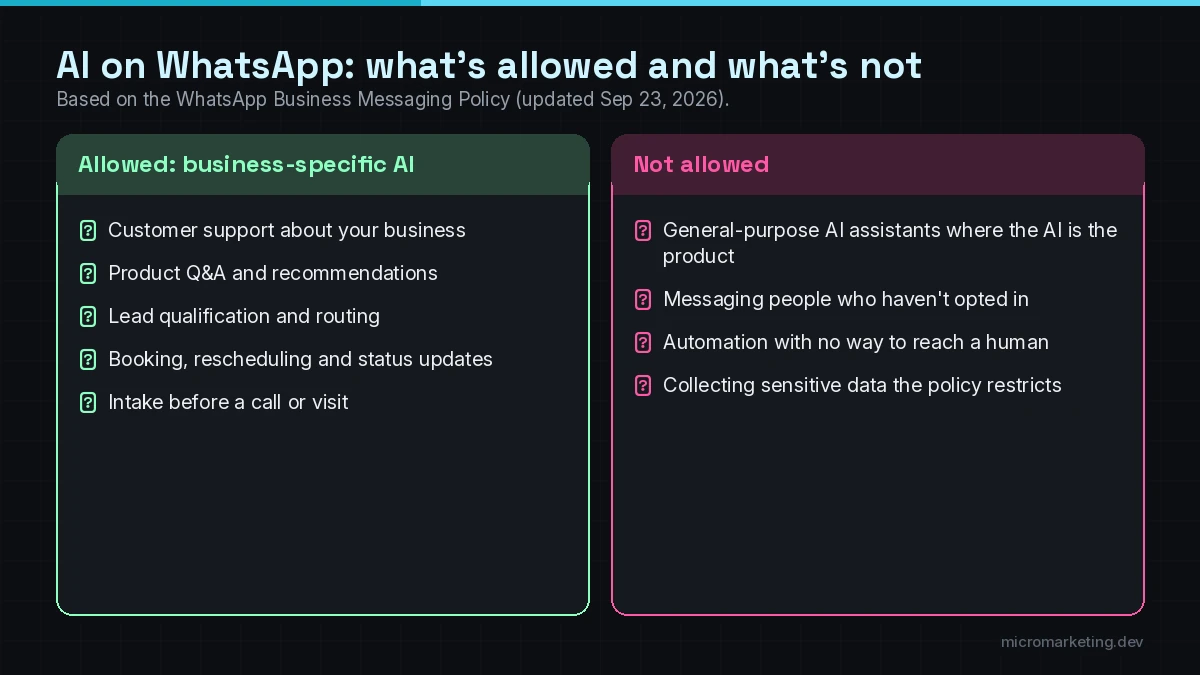
When Meta added its AI-provider restriction, it told TechCrunch the change doesn’t affect businesses using AI to serve their customers on WhatsApp, and gave the example of a travel company running a customer service bot (TechCrunch). In practice, these business uses fit:
- Customer support: hours, policies, returns, troubleshooting, “how do I…” questions about your products or services.
- Product Q&A and recommendations: answering questions about your catalog and suggesting the right option.
- Lead qualification: asking a few questions to understand what the customer needs and routing them to the right person.
- Booking and rescheduling: checking availability and booking into your calendar.
- Order and appointment updates: status lookups and confirmations.
- Intake: collecting the details your team needs before a call, quote or visit.
The common thread: the AI is there to help with your business, not to be a general chatbot that answers anything.
What’s not allowed: general-purpose AI assistants
The platform terms Meta introduced in late 2025 bar “AI Providers” (developers of large language models, generative AI platforms, general-purpose AI assistants and similar technologies) from using the WhatsApp Business platform to offer those technologies when they’re the primary functionality, rather than incidental or ancillary. Meta decides what counts. That’s why consumer AI chatbots from big AI companies stopped working on WhatsApp in January 2026, as TechCrunch reported in its update to the same article.
For a normal business, the practical line is:
- Fine: “Ask us anything about our menu, delivery times or catering,” powered by AI.
- Not fine: “Chat with our AI about anything: homework, recipes, coding,” where the AI itself is the product.
TechCrunch also reported that regulators in the EU, Italy and Brazil opened antitrust probes into these rules, and Meta has since adjusted how they apply in some markets. If you’re an AI company or you serve users outside the US, check the current terms for your countries.
The WhatsApp rules your AI still has to follow
AI doesn’t change the basics. From the Business Messaging Policy:
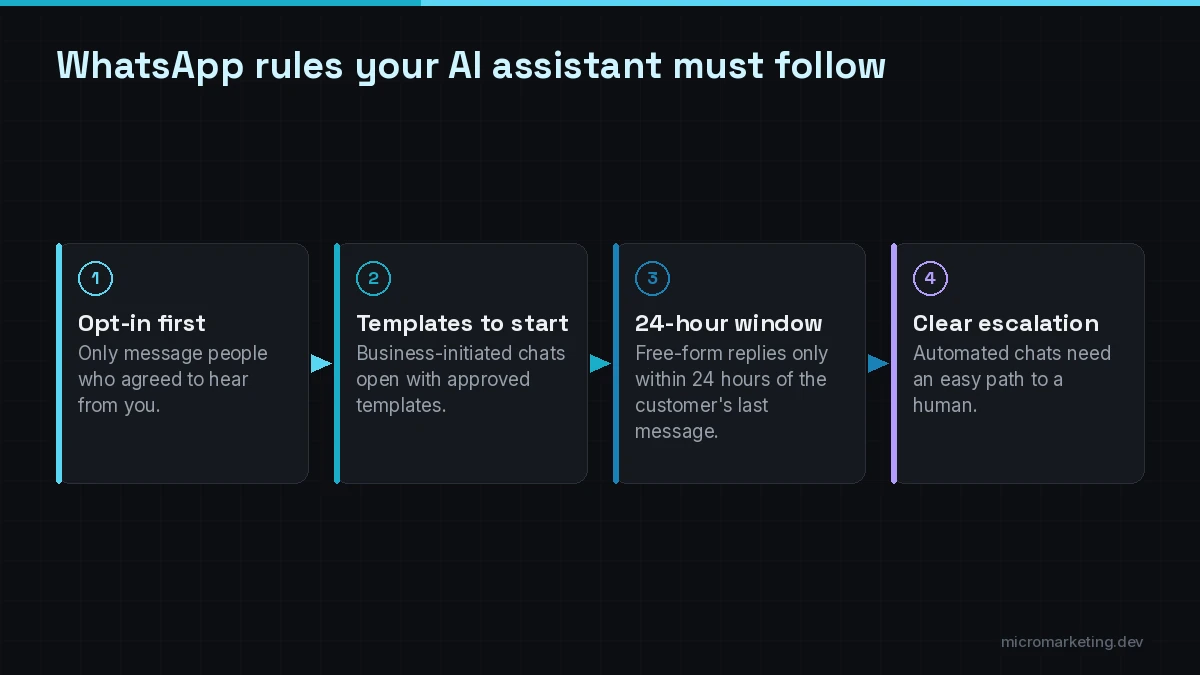
Get opt-in first
You can only contact people who’ve given you their number and opted in to receive messages or calls from you. You’re responsible for collecting that opt-in lawfully, and you must honor opt-out requests. Meta’s best practices suggest getting opt-in by message category, and a separate opt-in before you initiate calls.
Use approved templates to start conversations
On the Business Platform, you can only start a conversation with an approved Message Template, used for its designated purpose.
Free-form replies only inside the 24-hour window
You can reply without a template inside the 24-hour customer service window, which opens and resets with each message from the customer. Outside that window, you’re back to approved templates. Your AI assistant needs to know this, or it’ll try to send messages the platform won’t deliver.
Automation needs a clear way to reach a human
This is the rule most DIY bots miss. The policy says you may use automation in the 24-hour window, but you must also offer prompt, clear and direct escalation paths. It lists options such as an in-chat transfer to a human agent, a phone number, email, web support, an in-store visit or a support form.
Protect data and stay within your industry’s rules
The policy says don’t ask people to share full payment card numbers, financial account numbers, ID numbers or other sensitive identifiers. It also restricts health-related messaging where regulations require stricter handling, and it limits or bans messaging in certain regulated categories. Healthcare, finance and other regulated businesses should get advice before launching an AI assistant on WhatsApp.
In practice, most compliant setups are narrow on purpose: the assistant knows your products, services, hours and policies, and nothing else. That’s the design principle behind our WhatsApp and website AI assistants, which answer only from approved content and pass anything outside it to a person.
How to design a compliant WhatsApp AI assistant
A checklist we use for business WhatsApp assistants:
- Scope it to your business. Ground answers in your approved content: site pages, FAQs, policies, catalog.
- Build the human handoff first. An in-chat transfer to a person, with the conversation history attached, plus a fallback phone or email.
- Make the AI say “I’m not sure.” When a question is outside its knowledge, it hands off instead of guessing.
- Respect the 24-hour window. Follow-ups after the window use approved templates only.
- Track opt-in and opt-out in your CRM so the assistant never messages someone who said no.
- Keep sensitive data out of chat. Send payment and ID collection to secure links.
- Log and review conversations to close knowledge gaps and catch problems early.
Where we can help
We build AI assistants for WhatsApp, SMS, Messenger and website chat that are grounded in your content and hand off cleanly to your team. See our AI chatbots for WhatsApp, SMS and your website. If the assistant also needs to take multi-step actions across your systems, such as checking inventory, creating orders or updating the CRM, that’s an AI agent development project. For comparisons of chat platforms, see our roundup of customer service chatbots for 2026, or start with our full AI automation services.
Frequently asked questions
Can businesses use AI chatbots on WhatsApp?
Yes. Businesses can use AI for business-specific conversations such as customer support, product questions, lead qualification and booking. What’s restricted is AI companies offering general-purpose AI assistants as the main product on the WhatsApp Business Platform.
What is Meta Business Agent?
It’s Meta’s AI service for businesses in the WhatsApp Business app. You set it up from the Tools tab, teach it about your business and choose which chats it replies to. According to WhatsApp’s Help Center, it’s currently available only in limited countries to select businesses.
What is the WhatsApp 24-hour rule?
On the WhatsApp Business Platform, you can send free-form replies within 24 hours of the customer’s last message. Outside that window, you can only send approved Message Templates.
Does a WhatsApp AI bot need a human handoff?
Yes. The Business Messaging Policy allows automation in the 24-hour window but requires prompt, clear and direct escalation paths, such as an in-chat transfer to a human, a phone number, email or a support form.
Is the ban on general-purpose AI chatbots still in effect?
As of October 2026, Meta’s terms still restrict AI providers from offering general-purpose assistants as the primary function on the WhatsApp Business Platform, with adjustments in some markets after regulatory action. Check Meta’s current terms for your countries.
Want an AI assistant on WhatsApp that stays within the rules?
Tell us what your customers ask on WhatsApp today and how your team responds. We’ll map what the AI can handle, where the human handoff goes and how to stay inside Meta’s rules. Book a free strategy call, or map the booking flow in an AI Appointment Assistant session with Tony.
Newsletter
Get growth playbooks in your inbox.
Practical SEO, PPC, automation, and web strategy from the Micromarketing team. No fluff, unsubscribe anytime.