
What Is Hermes Agent? Nous Research's Open-Source AI Agent
Hermes Agent is Nous Research's free, MIT-licensed AI agent with memory, skills, messaging and an OpenAI-compatible API. What it does and how to run it.

Hermes Agent is a free, open-source AI agent built by Nous Research. You install it on your own computer or server, connect it to an AI model provider, and it works for you through a terminal, a desktop app or chat apps like Slack, Telegram and WhatsApp, with persistent memory, self-written “skills,” scheduled tasks and an OpenAI-compatible API. It’s released under the MIT license, so the software costs nothing; you pay for the model you connect and any hosting. For a business, it’s a powerful base for an internal assistant. It also needs careful setup, because an agent that can run commands on a server deserves real guardrails.
Last verified: October 18, 2026, against the official Hermes Agent site, its documentation and its GitHub repository. Open-source projects change fast; check the docs for the current feature list.
Hermes Agent vs the Hermes models: don’t mix them up
Searches for “Hermes AI” mix two different things from the same lab:
- Hermes models are a family of large language models trained by Nous Research. The Hermes Agent docs describe Nous Research as “the lab behind Hermes, Nomos, and Psyche.”
- Hermes Agent is the agent software. It isn’t a model. It runs on whichever model you connect, including models from Nous Portal, OpenRouter, OpenAI or any compatible endpoint, according to its documentation.
So “Hermes AI agent” usually means the software, and you can run it on a Hermes model or on something else entirely. (It’s also unrelated to the luxury brand, if that’s how you landed here.)
What Hermes Agent does
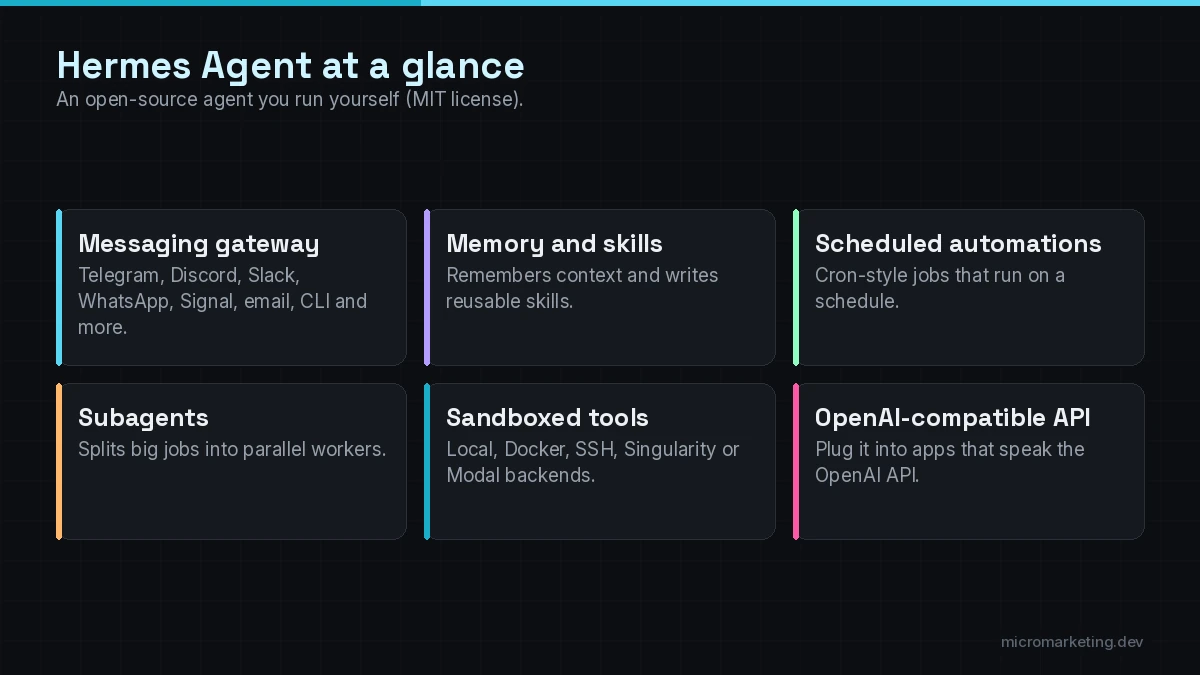
Based on the official site and docs, these are the core pieces:
It lives where you already work
A single “gateway” process connects the agent to messaging platforms. The site lists Telegram, Discord, Slack, WhatsApp, Signal, email and the command line, and the docs list more, including Microsoft Teams and Google Chat. One agent, one memory, every surface.
It remembers and writes its own skills
Hermes keeps persistent memory about your projects and preferences. After a complex task, it can create a reusable “skill” (a saved procedure) so it handles the same job better next time. The docs say skills follow the agentskills.io open standard and can be shared through a Skills Hub.
It runs scheduled automations
A built-in scheduler lets you set up recurring jobs in plain language, such as daily reports, nightly backups or weekly audits, with results delivered to any connected platform.
It splits big jobs into subagents
Hermes can spawn isolated subagents with their own conversations and terminals to work in parallel.
It uses real tools
Web search, browser automation, vision, image generation, text-to-speech, file operations, terminal commands and MCP servers for extra integrations.
It has an OpenAI-compatible API server
This is the “Hermes OpenAI” angle. The API server feature exposes Hermes Agent as an HTTP endpoint that speaks the OpenAI chat format. Any frontend or tool that can talk to an OpenAI-style API can use Hermes as its backend, and the agent answers with its full toolset and memory behind it. Separately, you can use OpenAI’s models as the brain behind Hermes. Those are two different connections, and both are optional.
What it costs
The software is free under the MIT license. The official FAQ says model providers and optional hosted services have their own pricing: you can bring your own provider, or use Nous Portal for model and tool credits, and cloud hosting is optional. Your real costs are:
- model usage (per token, from whichever provider you pick),
- hosting, if you run it on a server rather than a laptop,
- setup and maintenance time, which is the cost most people underestimate.
Business use cases that fit Hermes Agent
Hermes is strongest as an internal assistant for a small team that’s comfortable with some technical setup. Good fits:
- A team assistant in Slack that answers questions from your SOPs and documents, remembers project context and drafts replies.
- Scheduled reporting: “Every Monday at 8, pull last week’s numbers and post a summary to #ops.”
- Research and monitoring: competitor pages, industry news, supplier price changes, summarized on a schedule.
- Operations helpers for technical teams: log summaries, backup checks, routine server tasks, with approvals on anything risky.
- A backend for an internal chat tool through the OpenAI-compatible API.
Where we’d be careful: customer-facing deployments. An agent with terminal access, memory and web browsing talking directly to the public is a bigger security surface than a scoped chatbot. For customer chat, a purpose-built assistant is usually the safer choice.
How to set it up securely
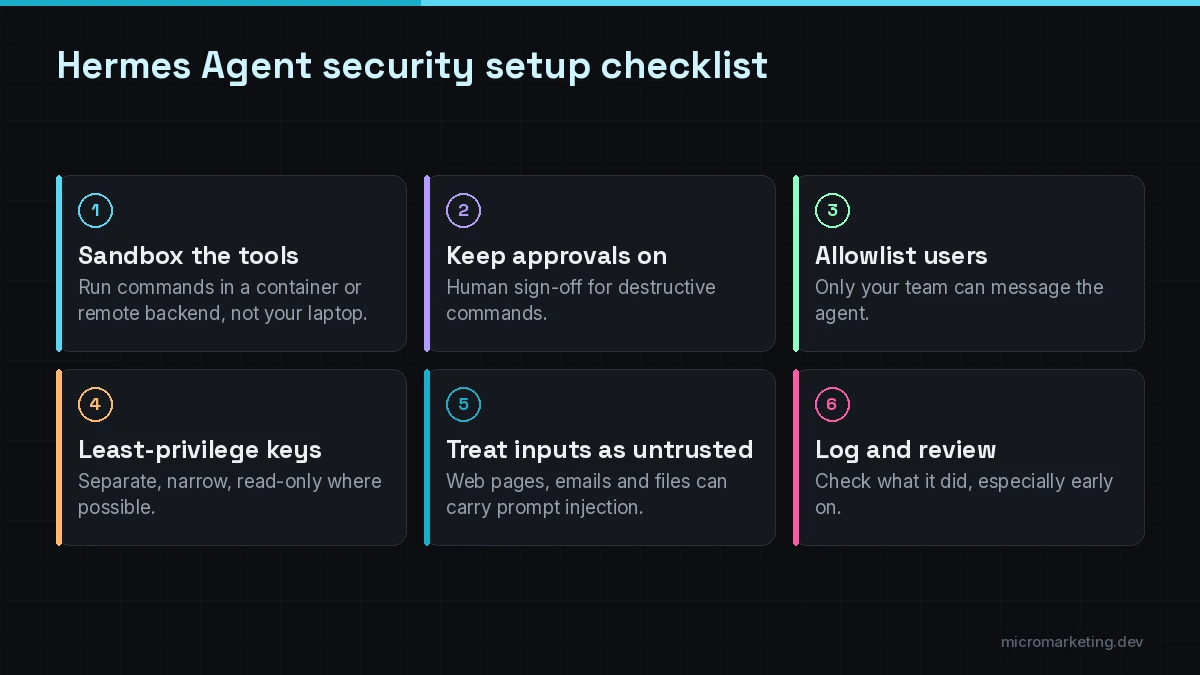
The Hermes docs describe a layered security model. The settings we’d treat as non-negotiable for business use:
- Run tools in a sandbox. Hermes supports several terminal backends, including local, Docker, SSH, Singularity and Modal, with container hardening. Don’t let a business agent run commands directly on a machine that holds sensitive data. Use a container or a separate server.
- Keep dangerous-command approval on. The docs describe a human-in-the-loop check for destructive operations, with “smart” and “manual” modes, plus an “off” mode the docs warn disables all safety prompts. Leave it on. For scheduled jobs, the default is to deny dangerous commands; keep that.
- Lock down who can talk to it. Use the user allowlists and DM pairing on messaging platforms so only your team can reach the agent.
- Give it narrow credentials. Separate API keys with the smallest permissions that work. Read-only wherever you can.
- Treat what it reads as untrusted. Web pages, emails and files can contain prompt-injection attempts. The docs mention context-file scanning for this; still assume some will get through and limit what the agent can do.
- Log and review. Check what the agent did, especially in the first weeks.
Hermes Agent vs a managed agent platform
Hermes Agent gives you control: you choose the model, where it runs, which tools it can reach and how approvals work. The trade-off is responsibility. You (or your provider) keep it updated, watch its logs, rotate its credentials and decide what happens when it fails. A managed agent platform inside a tool you already pay for takes most of that work off your plate, but limits which models, tools and channels you can use, and usually prices by seat or usage. A simple way to decide: if the job lives inside one platform and you’re comfortable with its data terms, start with that platform’s built-in agent. If the job crosses several tools, needs to run on your own infrastructure or needs a model you choose, an open-source base like Hermes Agent is worth the extra setup. Either way, scope it the same way we describe in our AI agent development process: narrow permissions, approvals on risky actions and a test set before launch.
When to hire help
Hermes Agent is well documented and installs with one command, so a technical owner can try it in an afternoon. You’ll want help when:
- it needs to connect to your CRM, help desk, calendar or internal APIs with proper authentication,
- you need it running reliably on a server, with monitoring, updates and backups,
- it’ll touch customer data or anything regulated,
- you want it orchestrated with other systems, for example triggered by n8n workflows,
- you need someone to define permissions, approvals and tests before it goes live.
That’s the work our AI agent development service covers: we pick the right base (Hermes Agent, an OpenAI-based build, or something else), set up the guardrails, connect your tools and monitor it after launch. If you’re comparing Hermes with OpenAI’s options, read GPT agents vs OpenAI AgentKit. For the bigger picture, see AI agents for small business, or our full AI automation services.
Frequently asked questions
What is Hermes Agent?
Hermes Agent is an open-source AI agent from Nous Research. You install it yourself, connect a model provider, and use it through a terminal, desktop app or chat apps like Slack and Telegram. It has persistent memory, self-created skills, scheduled tasks, sandboxed tools and an OpenAI-compatible API server.
Is Hermes Agent free?
The software is free and open source under the MIT license. You pay for the AI model you connect, any hosting, and optional Nous Portal credits if you use them.
Does Hermes Agent work with OpenAI?
Yes, in two ways. You can use OpenAI models as the model behind Hermes, and Hermes can expose its own OpenAI-compatible API so tools built for the OpenAI chat format can use it as a backend.
Is Hermes Agent the same as the Hermes AI model?
No. The Hermes models are language models from Nous Research. Hermes Agent is agent software that can run on a Hermes model or on models from other providers.
Is Hermes Agent safe for business use?
It can be, with the right setup: a sandboxed terminal backend, dangerous-command approval left on, user allowlists, least-privilege credentials and regular log reviews. We’d keep it to internal use unless it’s been carefully scoped and tested for customers.
Thinking about an open-source agent for your team?
Tell us the job you want it to do and where your data lives. We’ll tell you whether Hermes Agent is the right base, what guardrails it needs and what a first version looks like. Book a free strategy call. The first consult is free.
Newsletter
Get growth playbooks in your inbox.
Practical SEO, PPC, automation, and web strategy from the Micromarketing team. No fluff, unsubscribe anytime.